
GST Registration Certificate

Get your GST Registration Certificate quickly and easily. Follow our simple step-by-step guide to download, verify, and print your certificate from the GST portal. Start now and access your GST Registration Certificate online in just a few minutes.

50,000

Happy Customers

15+

Years of Experience

24 Hours

GSTIN Delivery

100%

Online Process

Choose Your GST Registration Package

All packages include CA-assisted filing, GSTIN delivery, and portal credentials. No hidden charges.

🥈 Silver Package

Just the GST registration — fast and affordable

999/-
  • GST Registration Certificate
  • GST Portal User ID & Password
  • Delivery in 48–72 hours
  • ARN tracking included

🥇 Gold Package

GST Registration + 6 months of returns

3999 1999/-
  • GST Registration Certificate
  • GST Portal User ID & Password
  • 6 Months GST Return Filing
  • Delivery in 24 Hours
⭐ RECOMMENDED

💎 Premium Package

GST Registration + 12 Month GST Return

7398 3,699
  • GST Registration Certificate
  • GST Portal User ID & Password
  • 12 Months GST Return Filing
  • Delivery in 24 Hours

🔒 Payments secured by Razorpay · 100% CA-assisted · Full refund if application fails due to our error. Refund Policy.

Do you Have any Query?

Get your GST Registration now! Fast, easy, and secure. Start today to stay compliant and grow your business!

PP
Reviewed by Pundreek Pandey Co-Founder & Compliance Expert, SetupFiling.in
Last updated Loading...

GST Registration Certificate: Complete Guide

If you are running a business in India and have registered under GST, you will receive a GST registration Certificate. This certificate is an important document that proves your business is officially registered under the Goods and Services Tax system. It also allows you to collect GST from customers and claim input tax credit.

Many business owners do not clearly understand what a GST Registration Certificate is, why it is important, and how to download it from the GST portal. In this simple guide, we will explain everything step by step so you can easily understand the process.

What is a GST Registration Certificate?

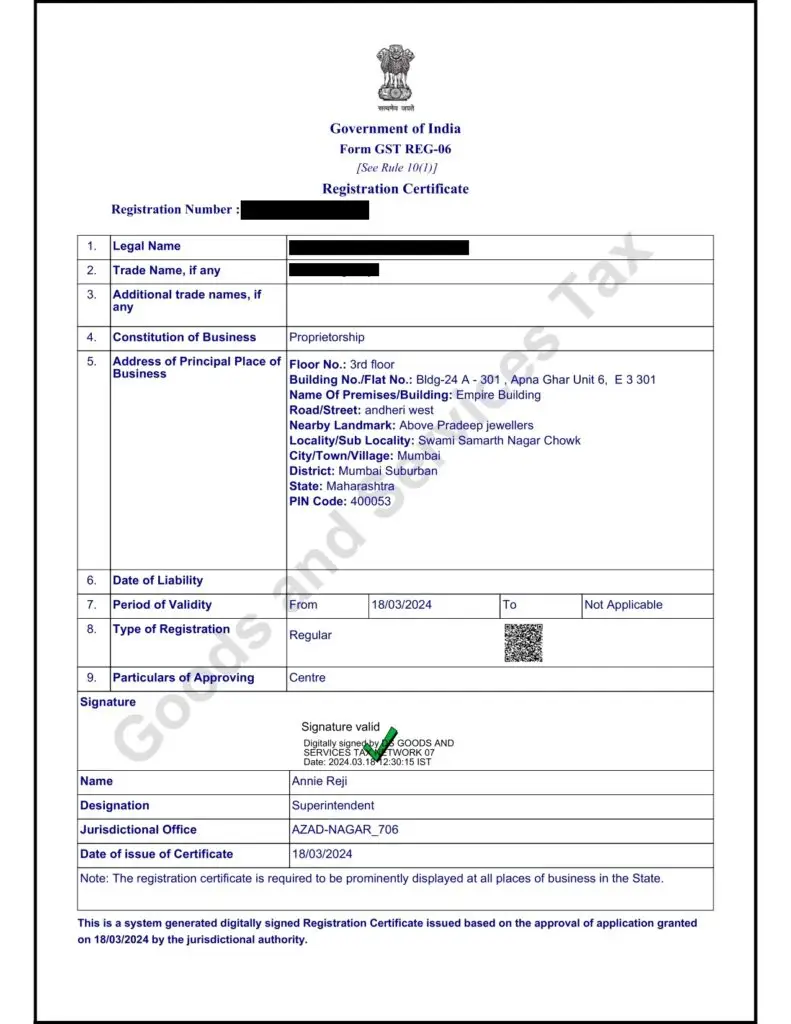
A GST Registration Certificate is an official document issued by the Government of India after a business successfully registers under GST. The certificate is also known as Form GST REG-06. This document confirms that your business is legally registered under GST and has been assigned a unique GSTIN (Goods and Services Tax Identification Number).

The certificate includes important details such as:

  • Business name
  • GSTIN number
  • Business address
  • Type of registration
  • Date of registration
  • Jurisdiction details
  • Digital signature of the tax authority

Once your GST registration is approved, the certificate becomes available for download on the GST portal.
Documents Required For GST Registration Certificate

Applicant Documents

  1. PAN card and Aadhar card, photograph of the Proprietor/Partners/Directors
  2. Certificate of Incorporation – If Applicable 
  3. PAN Card of Firm or Company – If Applicable
  4. MOA/Partnership Deed/ Trust Deed – If Applicable for you

Business Address Proof

  1. Rent Agreement  – If Rented 
  2. Electricity bill 
  3. Property Tax Receipt – if available

Why is a GST Registration Certificate Important?

The GST Registration Certificate is important for several reasons. It serves as proof that your business is authorized to collect GST from customers and comply with GST laws.

Here are some key reasons why it is important:

1. Legal Proof of GST Registration

The certificate proves that your business is officially registered under the GST system.

2. Required for Business Compliance

Many authorities, vendors, and clients ask for a GST Registration Certificate to verify your business registration.

3. Helps in Tax Collection

Only businesses with a valid GST registration can collect GST from customers.

4. Needed for Input Tax Credit

To claim Input Tax Credit on purchases, your business must have a valid GST Registration Certificate.

5. Required for Government Tenders

Many government projects and tenders require businesses to submit their GST Registration Certificate.

Who Needs a GST Registration Certificate?

Not every business must register under GST. However, certain businesses must obtain a GST Registration Certificate.

You may need GST registration if:

  • Your annual turnover exceeds the GST threshold limit.
  • You sell goods online through e-commerce platforms.
  • You run an interstate business.
  • You operate as an input service distributor.
  • You are required by law to register under GST.

The turnover limits may vary depending on the type of business and state.

When Do You Receive the GST Registration Certificate?

After you Apply for GST Registration, the application is reviewed by the GST department.

The usual process is:

  1. Submit GST registration application.
  2. Upload required documents.
  3. Verification by the GST officer.
  4. Approval of the application.

Once approved, the GST Registration Certificate is generated automatically on the GST portal.

You can then download it anytime using your login details

How to Download GST Registration Certificate

Downloading the GST Registration Certificate is very easy. You can do it online through the GST portal.

Follow these simple steps.

Step 1: Visit the GST Portal

Go to the official GST website.

Step 2: Login to Your Account

Enter your username and password to log in.

Step 3: Go to User Services

After logging in, click on Services in the main menu.

Step 4: Click on View/Download Certificate

Under the services section, select the option to view or download the GST Registration Certificate.

Step 5: Download the Certificate

Your GST Registration Certificate will appear on the screen. You can download it in PDF format and save it on your device.


Details Mentioned in GST Registration Certificate

The certificate usually includes:

  • Legal name of the business
  • Trade name (if any)
  • GSTIN number
  • Constitution of business
  • Address of principal place of business
  • Additional places of business
  • Date of registration
  • Type of registration
  • Jurisdiction details

If you find any mistake in the certificate, you should update your GST profile immediately.

How to Verify a GST Registration Certificate

Sometimes you may need to verify the GST Registration Certificate of a supplier or business partner.

You can verify it using the GSTIN number.

Steps to Verify GST Registration

  1. Visit the GST portal.
  2. Click on Search Taxpayer.
  3. Enter the GSTIN number.
  4. Complete the captcha.
  5. Click search.

You will see the registration status and details of that business.

This helps confirm whether the GST Registration Certificate is valid or not.

Do You Need to Display the GST Registration Certificate?

Yes, according to GST rules, every registered business must display the GST Registration Certificate at the principal place of business.

This ensures transparency and helps customers verify that the business is GST compliant.

Businesses should also display their GSTIN on:

  • Invoices
  • Bills
  • Business documents

Benefits of Having a GST Registration Certificate

Having a GST Registration Certificate offers many advantages for businesses.

Builds Business Credibility

Customers and partners trust businesses that are registered under GST.

Expands Business Opportunities

You can work with large companies that require GST registration.

Helps in Tax Compliance

You can file GST returns and stay compliant with tax laws.

Allows Input Tax Credit

You can reduce tax costs by claiming credit on purchases.

Get Your GST Registration Certificate

Get your GST Registration Certificate now! Fast, easy, and secure. Start today to stay compliant and grow your business!

GST Certificate: Frequently Asked Questions

Complete guide for GST Certificate download, verification, and usage in India - Updated 2026

What is a GST Certificate?

+
A GST Certificate is an official document issued by the Government of India to businesses registered under the Goods and Services Tax (GST) system. It is issued in Form GST REG-06 and serves as legal proof that your business is authorized to collect GST, claim input tax credit (ITC), and operate across India in compliance with GST laws.

How do I download my GST Certificate online?

+
Visit www.gst.gov.in, log in with your credentials, go to Services > User Services > View/Download Certificates, and click Download next to your certificate. The certificate downloads as a PDF file in less than 5 minutes.

Can I download my GST Certificate without logging in?

+
No, login to www.gst.gov.in is mandatory to download your GST Certificate. You need valid login credentials to access Form GST REG-06. You can only verify basic registration status without logging in.

How many days after GST registration can I download the certificate?

+
Your GST Certificate becomes available immediately after your GST registration is approved. Once your GSTIN is generated and approved, the certificate is instantly available on the portal for download.

Is downloading GST Certificate free?

+
Yes, downloading GST Certificate is completely free. There is no government fee for downloading the certificate from the official GST portal. You can download it unlimited times without any cost.

What information is included in the GST Certificate?

+
Your GST Certificate includes: GSTIN (15-digit tax ID), Business Name, Business Address, Registration Type, Date of Issue, Constitution Type, Date of Liability, Authorized Person Details, QR Code, and Digital Signature for authenticity.

Is a digitally downloaded GST Certificate legally valid?

+
Yes, a digitally downloaded GST Certificate is fully legally valid across India. The certificate is digitally signed by the issuing authority under the Information Technology Act and requires no physical stamp or signature. Banks, government institutions, and e-commerce platforms accept it as legal proof.

Is it mandatory to display GST Certificate at my office?

+
Yes, under Rule 18 of CGST Rules 2017, you must display your GST Certificate prominently at your principal place of business and all additional places of business. Failure to display can attract penalties up to ₹25,000 under Section 125 of CGST Act.

Can I print my downloaded GST Certificate?

+
Yes, you can print your GST Certificate. Open the downloaded PDF, go to File > Print (or Ctrl+P), and print the certificate. A printout of the digitally signed PDF is acceptable for display at your business premises as per GST rules.

What if I lost my GST Certificate?

+
If you lost your GST Certificate, you don't need to request a new one. Simply log in to www.gst.gov.in and download it again. The certificate can be re-downloaded any number of times from the portal without any separate process or fee.

Can I download multiple copies of my GST Certificate?

+
Yes, you can download your GST Certificate multiple times. There is no restriction on the number of times you can download your certificate from the portal. You can get as many copies as needed without paying any fee.

What should I do if my GST Certificate shows wrong details?

+
If your certificate contains incorrect details like wrong address, name, or business information, file an amendment application through Services > Registration > Amendment of Registration on the GST portal. Core field amendments require officer approval within 15 working days. Once approved, a new updated certificate will be issued.

How do I download GST Certificate on mobile?

+
You can download GST Certificate using a mobile browser. Go to www.gst.gov.in on your phone's browser, log in with your credentials, navigate to Services > User Services > View/Download Certificates, and tap Download. The PDF will download to your phone.

Is the GST Certificate same as Registration Certificate?

+
Yes, GST Certificate and GST Registration Certificate refer to the same document. Both terms are used interchangeably. The official form is GST REG-06 issued by the government.

What should I do if I forgot my GST portal password?

+
Go to www.gst.gov.in, click 'Forgot Password', enter your GSTIN, provide your registered email or mobile number, enter the OTP received, and create a new password. If you can't access the registered email/mobile, contact your GST officer.

Can I download GST Certificate from mobile app?

+
The official GST portal does not have a dedicated mobile app for downloading the complete GST REG-06 certificate. While third-party apps may show details, you must use the web portal at www.gst.gov.in for downloading the official certificate.

Does my GST Certificate expire?

+
For regular GST taxpayers, the certificate does not expire and remains valid until cancelled or surrendered. For casual and non-resident taxpayers, the certificate is valid for up to 90 days from the date of registration as specified on the certificate.

How can I verify if a GST Certificate is genuine?

+
Verify by: (1) Scanning the QR code using your phone camera, (2) Searching the GSTIN on www.gst.gov.in using Search Taxpayer, (3) Verifying GSTIN format - 15 digits with first 2 as state code, next 10 matching PAN, entity number, letter Z, and check digit.

What are the uses of GST Certificate in India?

+
GST Certificate is required for: Opening bank accounts, applying for business loans, vendor onboarding, participating in government tenders, registering on e-commerce platforms, demonstrating tax compliance, obtaining business credit, and regulatory audits.

Do I need a separate certificate for each branch?

+
No, one GST registration covers all branches and operations under the same business entity. Each branch must be registered as an additional place of business under the same GSTIN. If you have multiple distinct businesses, each requires separate registration.

What is Form GST REG-06?

+
Form GST REG-06 is the official GST Registration Certificate issued by the Government of India. It is issued after approval of GST registration and contains GSTIN, business name, address, constitution, and registration type. Banks and vendors recognize it as proof of GST registration.

Can composition dealers download GST Certificate?

+
Yes, composition dealers can download their GST Certificate. However, it clearly identifies them as 'Composition Taxable Person'. Composition dealers cannot collect regular GST and cannot claim ITC. The status must be displayed at the business premises.

What if my GST registration is suspended or cancelled?

+
If cancelled, your certificate becomes invalid. Common reasons include non-filing of returns for 6 months or tax violations. Once cancelled, you cannot issue GST invoices or claim credit. To restore, file pending returns with late fees and contact your GST officer.

Is GST Certificate required for MSME loans?

+
Yes, GST Certificate is commonly required for MSME loans and business financing. Banks and NBFCs ask for Form GST REG-06 as proof of registration and tax compliance. An active certificate improves loan approval chances and helps get better terms.

How often should I download a fresh GST Certificate?

+
You should download a fresh certificate whenever your details change (address, name, authorized signatory) or when you need an updated version. Each approved amendment generates an updated certificate. Always use the latest version for compliance.

Can others verify my GSTIN without the certificate?

+
Yes, anyone can verify a GSTIN without the certificate. They can go to www.gst.gov.in, use Search Taxpayer option, enter the GSTIN, and see basic registration details like business name, state, and status. But they cannot download your actual certificate without your login credentials.

What if I want to check my registration status before downloading certificate?

+
Go to www.gst.gov.in, click 'Search Taxpayer', enter your GSTIN, and see your registration status. Possible statuses are: Active (registration is valid), Suspended (temporarily inactive), or Cancelled (permanently invalid). If Active, you can then download your certificate.

Can I share my GST Certificate with business partners?

+
Yes, you can share your downloaded GST Certificate PDF with vendors, banks, clients, and business partners. The digital certificate is legally valid proof of registration. Before sharing, ensure your registration status is 'Active' on the portal to maintain credibility.

What details must be correct before submitting GST Certificate?

+
Before submitting your certificate, verify: GSTIN is correct, business name matches, address is current, registration type is accurate, status shows as 'Active', and authorized signatory name is correct. Ensure you submit the complete multi-page PDF, not just the first page.

How many pages should my GST Certificate have?

+
Your GST Certificate is a multi-page PDF document. Banks and government authorities require the complete certificate with all pages. Submitting only the first page is incomplete and may be rejected. Always send the entire PDF without missing any pages.

Can I get GST Certificate before completing 30 days of registration?

+
Yes, once your GSTIN is generated and approved, your certificate is available immediately for download. You don't need to wait 30 days. The GST certificate becomes available as soon as the registration application is approved.

What if my authorized signatory changes?

+
If your authorized signatory changes, you must file an amendment application through Services > Registration > Amendment of Registration. This is a core field amendment that requires officer approval. Once approved, a new certificate with updated signatory details will be issued.

Can I download certificate if I have unpaid GST dues?

+
Yes, you can download your certificate even if you have unpaid GST dues. The certificate download is not blocked by pending tax Payments. However, your registration status may show as 'Active' or 'Suspended' depending on the severity of non-compliance.

Is GST Certificate required to open a business bank account?

+
While not always mandatory, most banks ask for GST Certificate when opening a business account. It serves as proof of business registration and legitimacy. Having the certificate ready speeds up the account opening process.

Can I save GST Certificate in cloud storage?

+
Yes, save your GST Certificate in secure cloud storage like Google Drive, Dropbox, OneDrive, or AWS S3 with a clear filename like 'BusinessName_GST_Certificate_2026.pdf'. This ensures you always have access to the document when needed without searching physical files.

Similar Posts